User Guide
Everything you need to master Plan&Multiply and the 3F Method
Last updated: March 2026
The 3F Method
The 3F Method is the heart of Plan&Multiply. It divides your budget into 3 simple zones:
Fixed (green) — Your recurring, non-negotiable expenses: rent, utilities, insurance, subscriptions.
Flexible (blue) — Your variable daily expenses: groceries, entertainment, restaurants, transport. These are expenses you control.
Future (amber) — Your savings and projects: holidays, emergency fund, home purchase. Money you set aside for tomorrow.
Conservative
50% Fixed / 30% Flexible / 20% Future
Ideal for beginners or tight budgets
Balanced
40% Fixed / 40% Flexible / 20% Future
For a good balance between spending and saving
Ambitious
40% Fixed / 30% Flexible / 30% Future
To accelerate your savings
Getting Started
The onboarding guides you through 5 steps to set up your budget in under 5 minutes:
1. Your profile — Student, Employee, Family, or Freelance. This personalizes suggestions.
2. Your income — Enter your income sources (salary, freelance, benefits). You can add multiple sources.
3. 3F Split — Choose a profile (Conservative, Balanced, Ambitious) or customize with sliders.
4. Your envelopes — Set up your variable expense categories: Groceries, Entertainment, Transport, etc.
5. Your savings jars — Define your goals: Holidays, Emergency Fund, Project...
A visual summary lets you review everything before confirming.
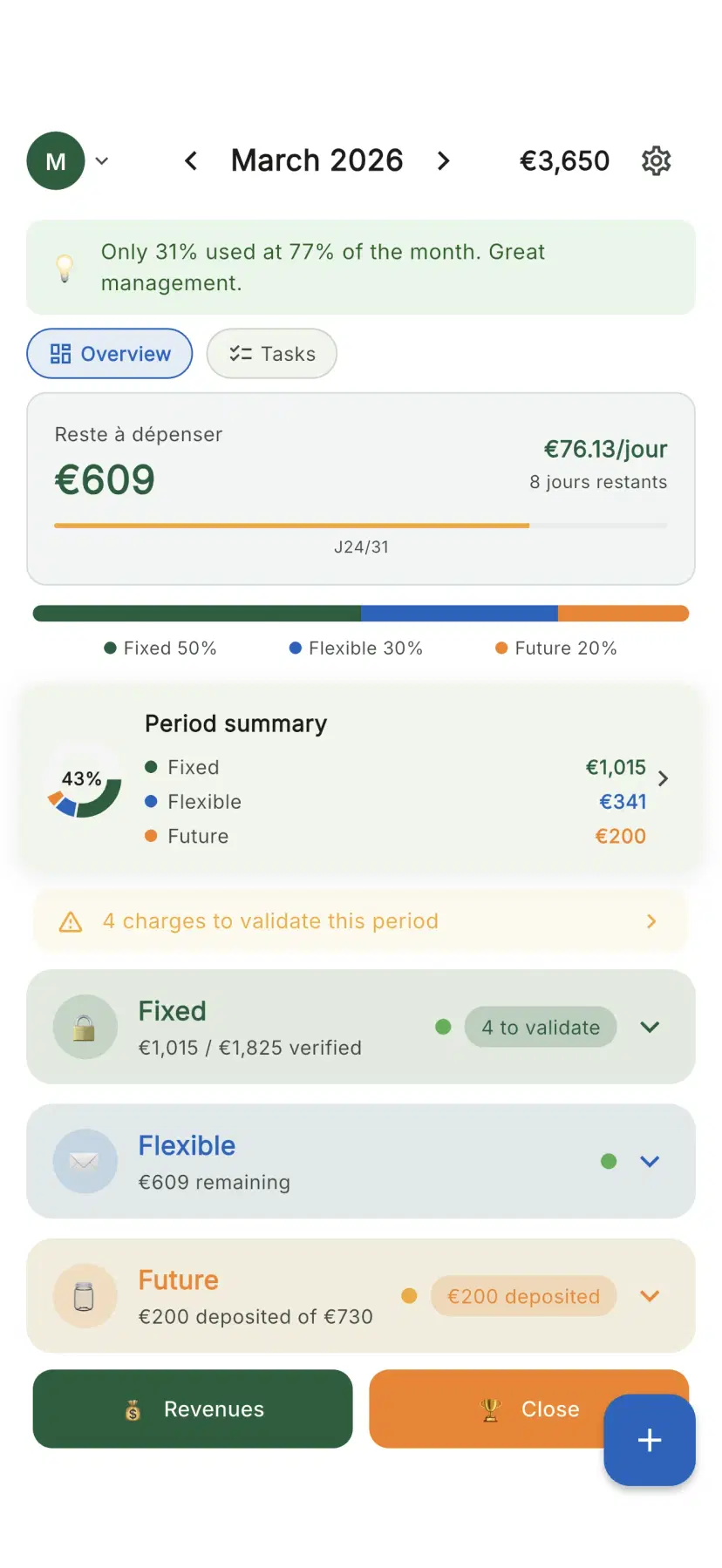
Plan&Multiply Dashboard with 3 drawer view
The Dashboard
The dashboard is the central screen. It shows your budget as 3 clickable drawers.
Global view (when no drawer is open):
- 3F split bar with colored segments
- Mini analytics with 6-period trend
- Serenity Score (colored circle 0-100)
- Extra block if budget is unallocated
Drawers: click a drawer to expand it. Only one drawer can be open at a time.
The + button (bottom right): opens quick expense entry.
Automatic checks on load: period transitions, daily bulletin, savings milestones, budget tension alerts.
Main dashboard with 3 budget drawers
Fixed — Recurring Expenses
The green drawer manages your recurring expenses: rent, utilities, subscriptions, insurance.
In the drawer: list of charges with verification checkbox, badge showing how many are verified.
Fixed Detail: total budget summary, complete list with category and frequency, add/edit/delete charges.
Occurrence system: recurring charges have templates and per-period occurrences, auto-generated at each period start.
Flexible — Budget Envelopes
The blue drawer manages your variable expenses through envelopes.
In the drawer: envelopes with progress bars that empty as you spend. Colors: green (>60%), amber (30-59%), orange (10-29%), red (<10%).
Envelope detail: animated illustration, remaining amount, EUR/day estimate, transaction history with auto-categorization.
Quick expense: numeric keypad (autofocus), envelope selection, "Got it!" button with haptic feedback.
The Reserve: special envelope that absorbs unallocated budget. Your safety cushion for unexpected expenses.
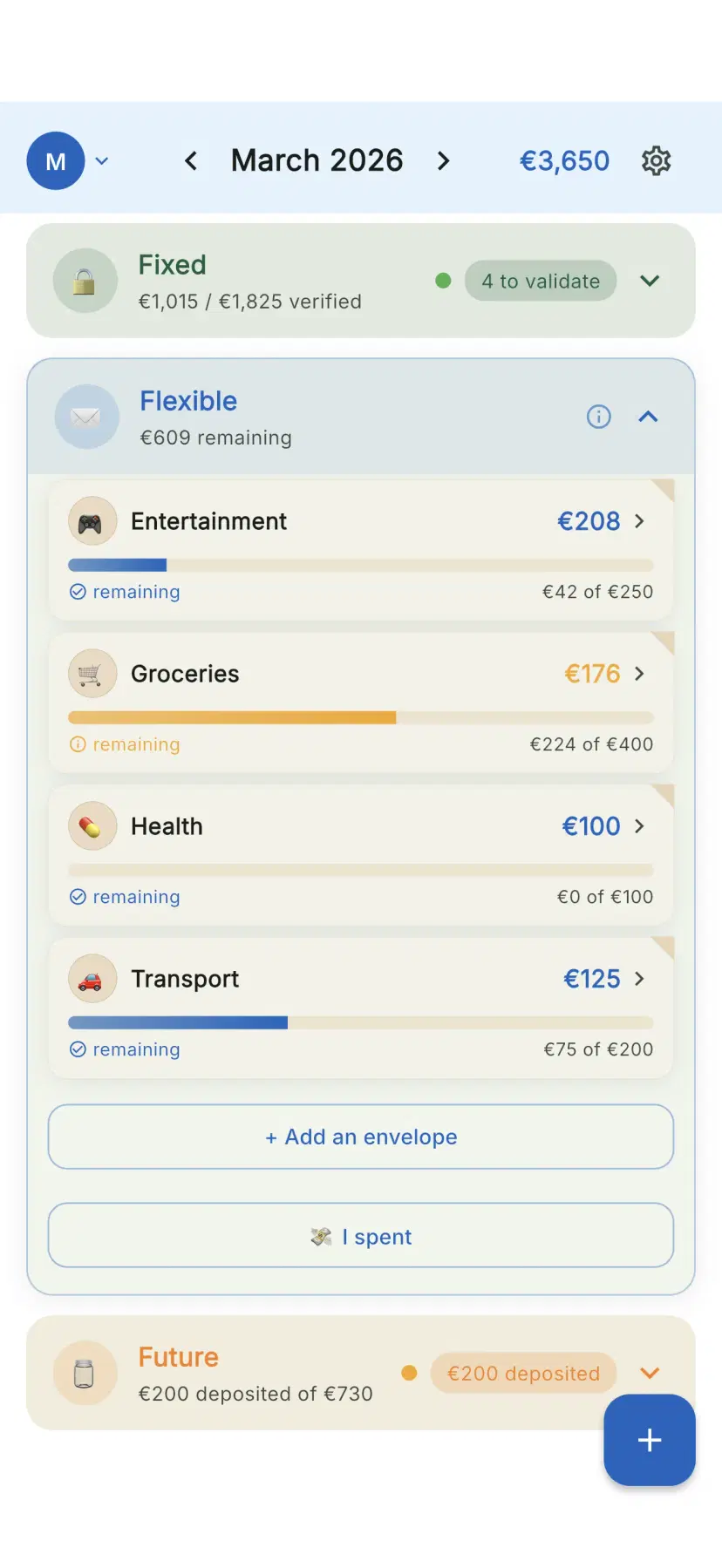
The Flexible drawer with budget envelopes
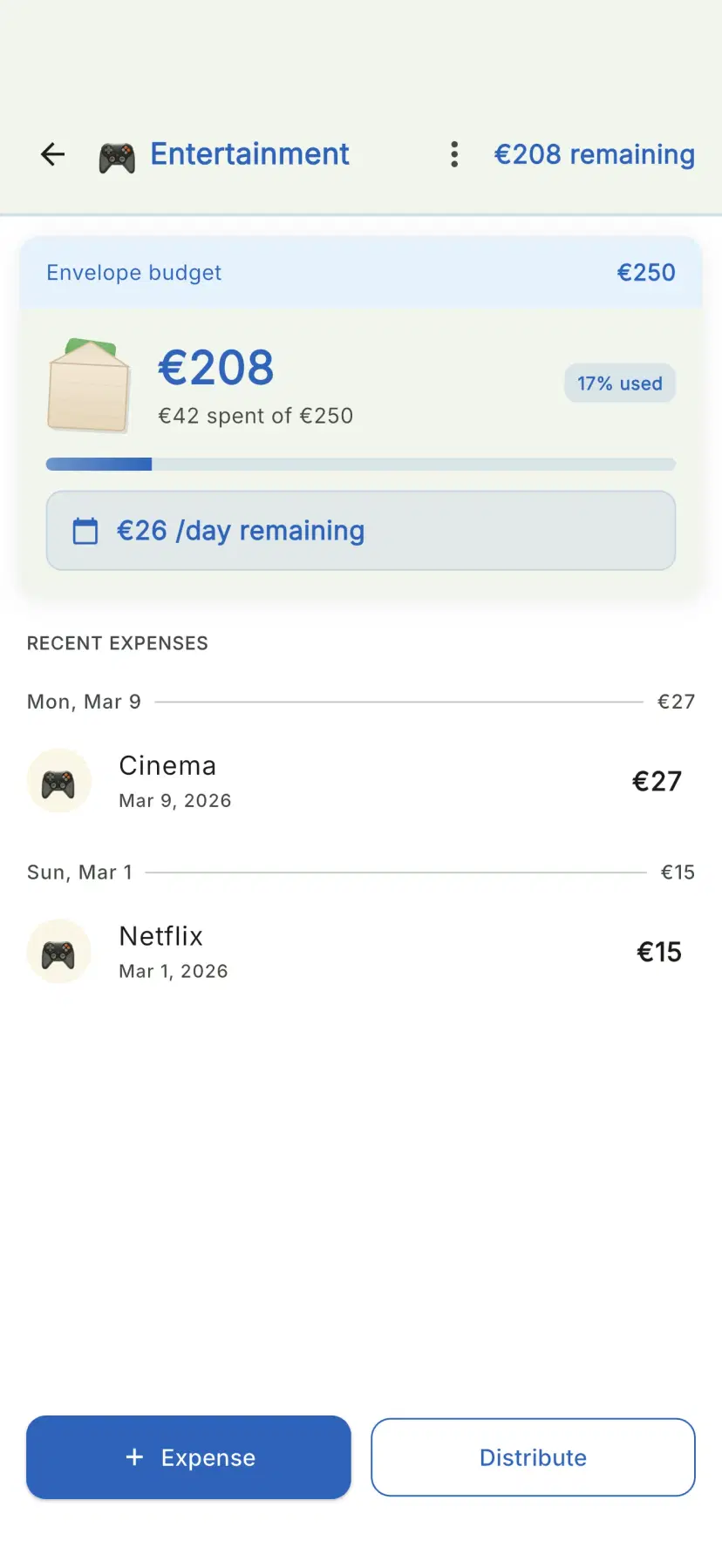
Envelope detail with progress bar
Future — Savings & Projects
The amber drawer manages your savings with jars and projects.
Savings jars: animated glass jar illustration, target amount, deposits history, completion estimate.
Projects: name, target, accumulated amount, progress bar, projected completion date.
The Cushion: special jar absorbing unallocated savings. Your precautionary savings.
Provisions: jars linked to a recurring charge for monthly provisioning. Example: annual car insurance of 1,200 EUR provisioned at 100 EUR/month.
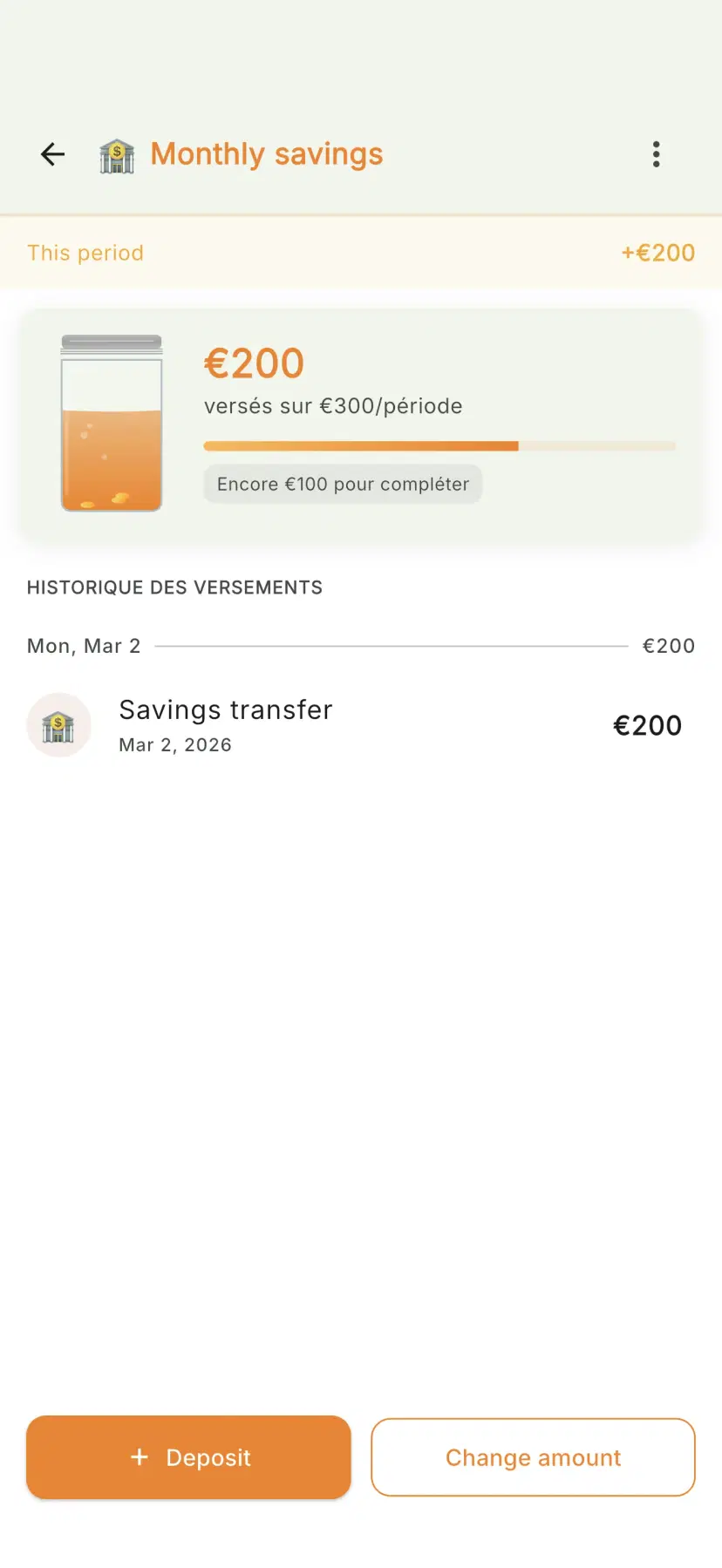
Savings jar detail in The Future
Quick Add
Record an expense in 3 seconds from the + button.
1. Numeric keypad opens immediately
2. Enter the amount
3. Choose the envelope (last used is pre-selected)
4. Tap "Got it!"
The app auto-categorizes and updates your widget. From the widget: the "Quick expense" button opens this directly, even when the app is closed.
Periods: Start & Closure
Period start: enter your income (pre-filled from last period), adjust the 3F split if needed.
Period closure: enriched summary with progress per drawer, earned badges (with confetti!), surplus management.
2-level surplus: first per-drawer (each envelope surplus treated individually), then global (remaining surplus: save, carry over, or redistribute).
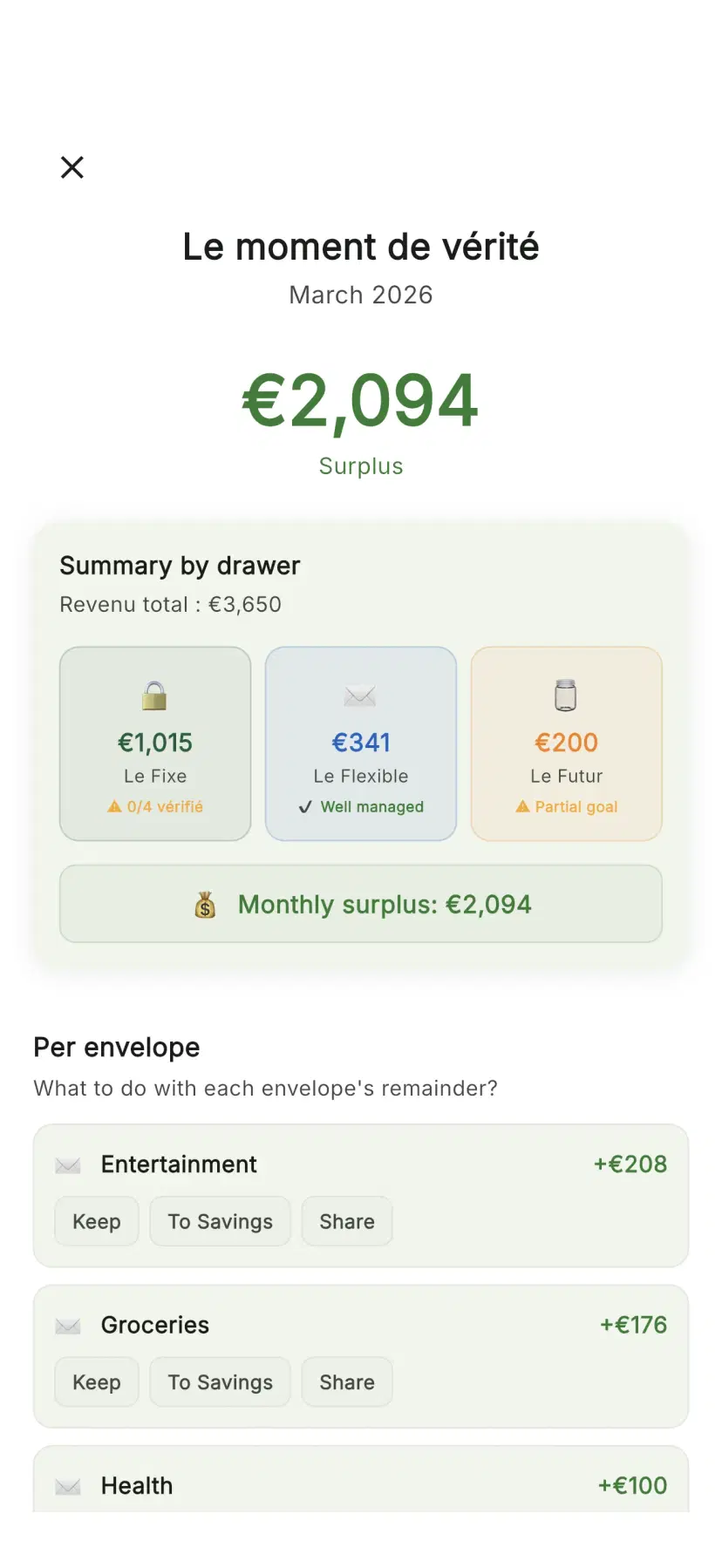
Period closure screen with summary
Categories & Auto-categorization
Expenses are auto-categorized: Food, Transport, Health, Entertainment, Home, Other.
Learning: each correction improves future suggestions. After a few corrections, expenses in the same envelope will be correctly categorized.
Category analysis (Premium): pie chart breakdown, detail per category, comparison with previous period.
Envelope Carry-Over
Carry-over lets you keep unspent envelope balance across periods.
3 modes: None (reset to zero), Unlimited (full carry-over), Capped (up to a maximum amount).
Configure in each envelope's detail. The carried-over amount is visible on the dashboard.
Multi-source Income
Define multiple income sources: Salary, Freelance, Benefits, Investments, Other.
Templates based on your profile: Student (Scholarship, Part-time job), Employee (Salary), Family (Salary 1, Salary 2, Benefits), Freelance (Missions, Regular clients).
Analytics & Trends
6-period trend: sparkline chart showing income, expenses, and savings evolution.
Monthly comparison: planned vs actual per drawer, % variation from previous period.
Category breakdown (Premium): pie chart with per-category detail.
Analytics detail: interactive charts, top 3 most-spent envelopes and categories.
Serenity Score & Context Engine
Serenity Score (0-100): 80-100 (green) Excellent, 60-79 (amber) Good, 40-59 (orange) Attention, 0-39 (red) Alert.
Based on: charge compliance, envelope respect, savings contributions, usage regularity, timely closure.
Context Engine: personalized insights — alerts, celebrations, challenges, comparisons, predictions. Always positive, never judgmental.
Home Screen Widget
A widget showing your envelopes at a glance on your home screen.
Content: total remaining, daily budget, up to 5 envelopes with progress bars, quick expense button.
iOS: Long press > "+" > Search "Plan&Multiply" > Choose widget
Android: Long press > "Widgets" > Search "Plan&Multiply" > Drag to screen
Configure displayed envelopes in Settings > Widget.
Settings
Budget: 3F split, budget cycle (start day), income
Appearance: Theme, color palette, language, currency
Accessibility: Text size (100-200%), high contrast, non-color indicators
Data: Envelopes, charges, export/import, migration, reset
Subscription: Premium status, cloud sync
Gamification
Badges (evaluated at closure): Precise, Saver, Locked, Quick, Perfect, Regular.
Streaks: consecutive days counter (1 grace day per week). Milestones at 7 and 30+ days.
Savings milestones: confetti notification at 25%, 50%, 75%, and 100%.
Share cards (Premium): share your streaks, scores, and goals.
Notifications
3 layers: periodic reminders, contextual alerts, celebrations.
Daily bulletin: personalized summary with budget/day, unchecked charges, critical envelope, savings progress.
Tip Bar: contextual tips that adapt and disappear after a few views.
Sharing & Multi-user
(Premium) Manage a shared budget, ideal for couples or roommates.
3 modes: 50/50, 100% (single income), Prorata (based on each person's income).
Invite: Settings > Sharing > "Invite" > QR code or link. Data synced in real-time.
Export & Migration
Export (Premium): export all data as JSON.
Import: import a JSON file with verification.
Migration from old app: via Firebase or email/password from your old account.
Accessibility
WCAG 2.1 AA compliant: 4.5:1 contrast, 48x48dp touch targets, screen reader labels, text zoom up to 200%.
Dark mode: smooth transition, no pure black/white.
Settings: text size, high contrast, non-color indicators.
Supported Languages
Language changes are instant and don't affect your data. All languages are 100% translated.
French
FR
English
EN
German
DE
Spanish
ES
Italian
IT
Portuguese
PT
Glossary
Ready to take control of your budget?
Download Plan&Multiply for free and start the 3F Method today.