Best Budget App Without Plaid in 2026: Privacy-First Alternatives
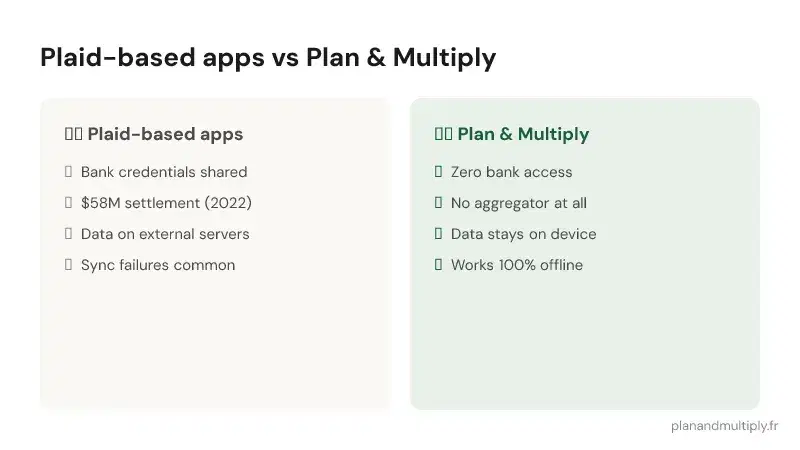
Plaid powers most popular budget apps — YNAB, Copilot, Monarch Money. But after Plaid's $58M class-action settlement in 2022 over collecting more user data than disclosed, many people are looking for alternatives. Here's what's available in 2026 if you want to budget without giving away your bank credentials.
Why avoid Plaid?
Plaid acts as a middleman between your bank and your budget app. When you connect your bank, Plaid gets access to your full transaction history, account balances, and sometimes even your login credentials. The 2022 lawsuit revealed Plaid was collecting more data than users consented to and sharing it in ways that weren't clearly disclosed.
Even if you trust Plaid today, any centralized data store is a target. One breach could expose the financial data of millions of users simultaneously.
Manage your budget easily
Download Plan & Multiply and take action today.
Discover the appFree · no bank connection · no sign-up


Plan & Multiply: the privacy-first choice
Plan & Multiply takes a fundamentally different approach: no bank connection at all. You log expenses manually, and all data stays on your device. No Plaid, no Yodlee, no MX, no aggregator of any kind.
What you get: digital budget envelopes, real-time tracking, a Serenity Score for financial wellness, couple sharing via QR code (no bank linking), and offline functionality. What you don't get: automated transaction import. That's a conscious trade-off for privacy.
Other budget apps without Plaid
Goodbudget: uses the envelope method with manual entry. Free for 10 envelopes, $10/month for unlimited. Web and mobile. No bank sync option at all.
Pennies (iOS only): a simple budget tracker with beautiful design. Manual entry, no bank connection. $3.99 one-time purchase. Limited to basic tracking.
YNAB: has a manual entry mode, but still pushes bank sync via Plaid. If you want to avoid Plaid entirely, you can use YNAB without connecting, but the app constantly prompts you to link your bank.
Comparison: budget apps without bank sync
Plan & Multiply stands out for three reasons: (1) the Serenity Score — no other app offers a holistic financial wellness indicator, (2) couple sharing via QR code without bank access, and (3) it's designed privacy-first from the ground up, not as an afterthought.
If your top priority is never sharing bank credentials with a third party while still having a full-featured budget app, Plan & Multiply is the strongest option in 2026.
Making the switch from a Plaid-based app
Switching to a manual budget app takes about a week of adjustment. The first few days feel slower — you're logging things you didn't have to before. By day 5, it's automatic. By the end of the first month, you'll notice something unexpected: you're more aware of your spending than you ever were with automatic import. That awareness is the whole point.
What Plaid actually is (and why "no Plaid" matters)
Plaid isn't a bank — it's the plumbing between your bank and the apps you connect. When a budget app says "link your account," Plaid is usually the service brokering that connection: it authenticates with your bank, pulls your transactions, and hands them to the app. Convenient, yes. But it means a third company sits permanently between you and your money data.
"No Plaid" is a real category, not a marketing angle. It means one of two things: either the app connects to banks through a different aggregator (Yodlee, MX, Finicity, Akoya) — same trade-off, different vendor — or the app has no bank connection at all and you enter transactions yourself. Only the second kind removes the aggregator risk entirely. When you compare apps, that's the line that matters: aggregator-free, or just Plaid-free?
How to check if an app uses Plaid before you download
You don't have to guess. Three quick checks:
- The connection screen. When an app asks you to "link a bank," the login pop-up often shows a small "Powered by Plaid" line, or the URL contains plaid.com. If you see it, Plaid is in the loop.
- The privacy policy. Search the policy for "Plaid," "Yodlee," "MX," or "aggregator." Apps that use one are legally required to disclose it. Apps with no bank sync say so explicitly.
- The App Store description. Aggregator-free apps tend to advertise it ("manual entry," "no bank connection required," "works offline") because it's their differentiator. If bank-linking is front and center, an aggregator is involved.
If an app makes it hard to find the answer, treat that as an answer.
Manual entry isn't a downside — it's the point
The obvious objection to a no-Plaid, no-sync app is "but I'll have to type everything in." True. But the friction is doing something. When the transaction lands automatically, you never see it — you find out at the end of the month that the money is gone. When you log it yourself, you make a small, conscious decision each time. That's the difference between tracking your past and steering your present.
The practical reality: you don't log everything. You log what matters — the daily spending that actually moves your budget. Fixed costs (rent, subscriptions) you set once. It takes seconds a day, and after the first week most people stop noticing they're doing it. What they do notice is that they finally know their real number to spend, without a bank connection deciding it for them.
Who a no-bank-sync app is (and isn't) for
It's a strong fit if you: value privacy and don't want a third party holding your transaction history; have already been burned by a data breach or a scary "we updated our permissions" email; budget as a couple and don't want to share bank logins; or simply find that automatic import makes you less aware of spending, not more.
It's a weaker fit if you: have dozens of transactions a day across many cards and genuinely can't spare ten seconds to log the ones that matter; or you specifically want reconciliation-against-statement as an accounting exercise. For most people budgeting to know "what's actually left," neither is a dealbreaker.
Frequently confused: "no Plaid" vs "no bank sync" vs "offline"
These get used interchangeably but they're different:
- No Plaid — might still sync your bank through another aggregator.
- No bank sync — no aggregator at all; you enter data yourself. But data may still live on a company's servers.
- Offline / on-device — data is stored on your phone, not a remote server. This is the strongest privacy posture: nothing to breach centrally, because there's no central store of your transactions.
Plan & Multiply is all three: no Plaid, no bank sync, and offline-first — your entries stay on your device. That's a deliberate design choice, not a missing feature.
The bottom line
If your goal is to budget without ever handing your bank credentials to a middleman, "no Plaid" is the floor, not the ceiling — aim for no aggregator at all. Enter what matters, keep your data on your device, and you get the one thing bank-sync apps quietly take away: awareness of your own spending, in real time, on your terms.